
⚠️ You can continue using the legacy Stakeholder Profile for 3 months starting April 23. After that, it will be retired, and all users will be transitioned to the new version. We encourage you to start exploring the updated Stakeholder Profile ahead of time.
Stakeholder Profile Record Layout
The Stakeholder Profile record is organised into clear sections to help users quickly view, manage, and understand stakeholder information.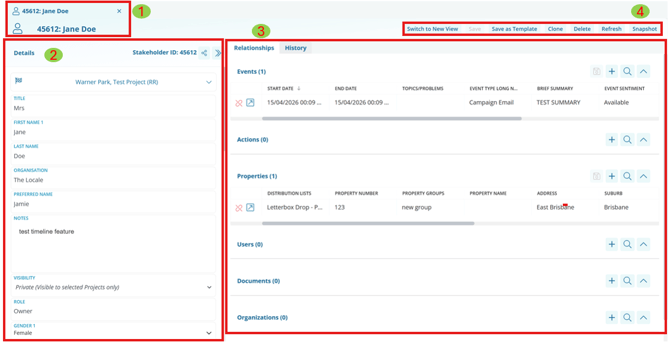
- Record tab: This gives the basic context of what information is open in that tab.
- Record Details: This is where you can see the basic information on the record that is open. This is where you can find the a Stakeholder's name and contact details.
- Record Relationships: These are where you can see all the related/linked records to this profile. This is where you can find any related Events, Actions, or Properties to a Stakeholder.
- Record Actions: This is where you'll see options you can utilise on this record. These options include saving, deleting, cloning, refreshing and reporting (snapshot).
Stakeholder Profile History Tab
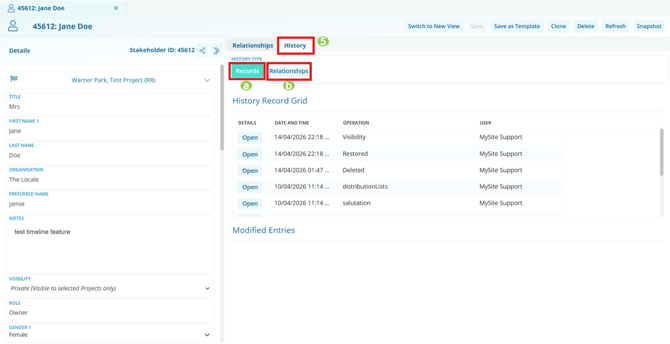
5. Record History Tab: This gives the basic context of what information is open in that tab. When looking at history, there are two main elements, the Record history (1), and the Relationship history (2).
a. Record History: The best place to view changes made directly to the record. This includes updates such as changes to a stakeholder’s email address, when an action notification has been sent, or when the issues/topics on an event have been modified.
b. Relationship History: The best place to view changes made to links between records. This includes when an event has been linked or unlinked to a stakeholder profile, or when an action has been reassigned to a different user.
How to Switch to the New Stakeholder Profile
Click “Switch to New View” to open the updated stakeholder profile.
You can learn more about the new experience here: Stakeholder Profile Overview